


SuperVPN - Fast VPN Proxy
4.646.36K Reviews
App Specs
- Version
- 3.1.4
- Updated On
- License
- Free
- Downloads
- 100,000,000+
- Developer
- SuperSoftTech
- Categories
- Tools
- Platform
- Android, iOS
Screenshots
 Analysis by AppCompare
My first impression of a VPN app is shaped by one simple question: can I get a useful connection without turning setup into a project? SuperVPN - Fast VPN Proxy is aimed at people who want a quick, uncomplicated way to route their phone’s internet traffic through a VPN. I would approach it as a convenient tool for everyday browsing, not as a reason to stop thinking carefully about privacy, account security, or the rules of a service I’m using.
What to expect from a one-tap VPN
SuperSoftTech’s app sits in the tools category, and its appeal is easy to understand: the first task is connecting, not learning a complicated set of networking options. It is free to install, has an Everyone age rating, and is currently at version 3.1.4. The broad audience and simple premise make it approachable, though a VPN still affects how your phone connects to the internet, so I would take a moment to understand the connection prompt before accepting it.
Its popularity is considerable: it has passed 100 million installs, with an average rating of 4.6 from around 5.2 million ratings and roughly 46,000 written reviews. Those figures tell me that many people have tried it, but they don’t prove that it is the best fit for every need. My own decision would depend more on whether the app behaves reliably on my connection and whether its privacy approach suits the kind of information I plan to access.
A VPN can be useful when I’m on public Wi-Fi, travelling, or trying to reach a site that is unavailable on my current network. It is not a magic shield: it does not make suspicious links safe, protect me from every scam, or guarantee that a service will accept a connection from a VPN. I’d keep normal precautions in place, including using secure accounts and checking that I’m on the genuine site or app.
Getting Started with SuperVPN
First things first, downloading and setting up SuperVPN - Fast VPN Proxy is a breeze. It's available for both Android and iOS, so whether you're Team Android or an iPhone aficionado, you're covered. The app has a simple interface, which means you won't need a manual to get started. Just download, install, and you're ready to roll.
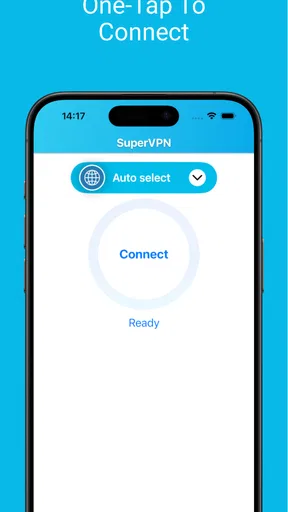
Upon opening the app, you're greeted with a clean and straightforward dashboard. No unnecessary clutter, just a big connect button waiting for you to tap it. So, I did. In a matter of seconds, I was connected to a VPN server, ready to surf the web securely. No lengthy setup processes or complicated configurations, just a simple tap and you’re connected.
Making the first connection count
For a first session, I’d start with a low-stakes task: open a familiar news site or check a page I already know loads on my usual connection. That gives me a practical sense of whether the VPN is working without mixing the test up with a login problem or a region-locked service. If a page fails, I’d disconnect and try again before assuming the site itself is blocked or the app is broken.
Worth Reading Before You Choose

Baby Panda World Brings Quick Play to Modern Phones, but Its Game Library Feels Busy

ESPN’s Live Game View Makes Following Close Games Easier

QuizzLand Review: A Good Fit for Short Trivia Breaks, Not Every Player

Basketball Stars: Multiplayer Is Fast, but Can It Recover When Matches Go Wrong?

WEBTOON Turns Phone Updates Into a Better Reading Routine

Link to Windows Runs on Shared Habits, Not Social Feeds
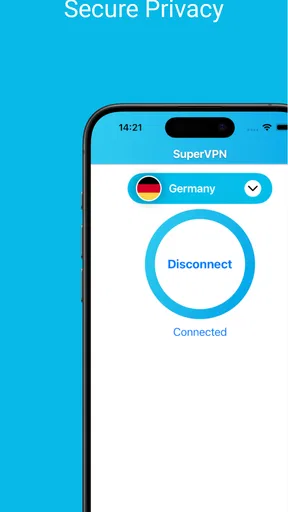
On a phone, a VPN connection normally needs the operating system’s permission to create a VPN profile. That prompt is part of how this kind of tool works, rather than a sign that the app has already connected. I’d read it, approve it only if I’m comfortable, and then look for the system’s VPN indicator as a simple confirmation that the tunnel is active. If I’m unsure, I’d test a basic page before opening banking, work, or other sensitive accounts.
A useful habit is to decide when I actually need the tunnel. For example, I might connect before joining public Wi-Fi at a café, check that ordinary browsing works, and disconnect when I’m back on a trusted home network if I don’t need the VPN there. This keeps the tool tied to a purpose and makes it easier to notice when a connection is affecting a particular app or site.
Features That Stand Out
Now, let’s dive into what makes SuperVPN tick. One of the standout features is the unlimited bandwidth. Yes, you read that right. You can stream, download, and browse without worrying about hitting any limits. This is a game-changer, especially if you’re someone who streams a lot of content or downloads large files.
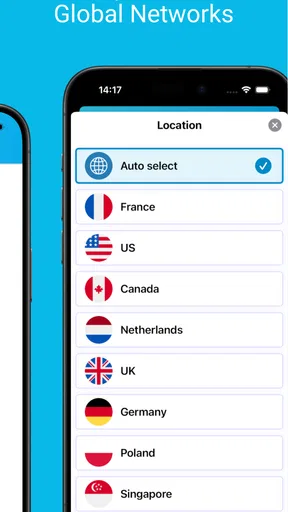
Another cool feature is the variety of server locations available. Whether you want to connect through Europe, Asia, or the Americas, SuperVPN has got you covered. This means you can easily bypass geo-restrictions and access content that might not be available in your region. I tried accessing some international content, and it worked like a charm.
Choosing a sensible use case
For me, a realistic everyday use would be checking email or reading the news while waiting at an airport, where I may prefer not to send traffic over an unfamiliar public network without a VPN. I’d connect first, confirm that a regular page opens, and then use the phone normally. If a work login or payment page behaves unexpectedly, I would pause and switch back to my usual connection rather than repeatedly retrying sensitive actions through a setup I haven’t verified.
Location changes can also be useful for checking whether a page is presented differently to visitors connecting from another region. I would treat that as a limited browsing convenience, not a promise that every streaming library, game, or shopping service will work. Services can restrict VPN traffic, and their terms may limit region switching. If access matters, I’d check the service’s own rules instead of assuming a VPN can override them.
One practical trade-off is that a VPN adds another leg to the route between my phone and a website. Even when browsing feels quick, a distant server or a busy network can make pages slower or cause a video to buffer. If speed matters more than changing my apparent location, I’d try a nearby connection or turn the VPN off for that task. A quick before-and-after check on the same page is more useful than judging the app from a single slow site.
Security and Privacy
Security is, of course, a major concern when it comes to VPNs, and SuperVPN doesn’t disappoint. The app uses strong encryption protocols to ensure your data is secure while you’re online. It’s comforting to know that your online activities are hidden from prying eyes. The app also promises a no-logs policy, which means they don’t keep any records of your browsing history. This is a big plus for anyone who values their privacy.
One thing I found particularly reassuring is the automatic kill switch feature. If your VPN connection drops for any reason, the kill switch will automatically cut off your internet connection to prevent any data leaks. This level of security is something I really appreciate.
What a VPN can and cannot do
I would separate the convenience of having a VPN from the stronger claim that any particular VPN is suitable for highly sensitive work. A VPN changes the route your traffic takes and can help protect it on an untrusted network, but it does not hide everything about your activity from every service you use. Websites can still recognize accounts, cookies, and information you choose to share. I’d continue to use unique passwords and multi-factor authentication where available.
There is also a trust trade-off worth considering: with a VPN, I’m relying on the VPN provider as part of my connection path. That makes the provider’s privacy practices important, not optional reading. If my main reason for installing an app is handling confidential work, sensitive research, or a high-risk privacy situation, I’d compare providers’ independently documented policies and controls before choosing. For casual browsing, I’d still avoid treating a privacy promise as a substitute for careful judgment.
For a quick connection check, I’d open a familiar page after connecting, then disconnect and compare how it behaves. If only one app stops working, I’d consider whether that service rejects VPN connections before changing phone settings. If the whole phone seems offline, I’d disconnect, check the regular network, and reconnect only once it is working normally. This simple sequence helps distinguish a VPN issue from weak Wi-Fi or a problem with the site.
How it compares with other ways to connect
Compared with configuring a VPN manually, a one-tap app is easier for someone who wants to get started without choosing technical settings. That simplicity is a genuine advantage when the goal is temporary protection on public Wi-Fi or uncomplicated browsing. The trade-off is less room for a careful user to assess and tune the connection themselves. People who need detailed control over protocols, server selection, or network rules may be better served by a VPN service that clearly exposes those choices.
Compared with a browser’s private mode, a VPN works at the connection level rather than merely keeping a local browsing session separate from other sessions on the device. Those are different tools: private browsing can be handy on a shared device, while a VPN may be useful on a network I don’t trust. Neither makes me anonymous by itself. I would choose based on the problem I’m actually trying to solve instead of expecting one setting to cover every privacy concern.
There is a further distinction between a general-purpose VPN app and a paid service chosen for predictable performance or detailed privacy documentation. SuperVPN costs nothing to download, but it also offers in-app purchases ranging from $2.99 to $59.99 per item. I’d check what an optional purchase changes before paying, and I would not assume that buying something automatically resolves a speed, access, or privacy concern. If I need a specific guarantee for work or travel, I’d compare the relevant terms first.
User Experience
The user experience with SuperVPN is pretty smooth. The app doesn’t bombard you with ads, which I find quite refreshing. It’s a clean and pleasant experience from start to finish. The connection speeds are impressive too. I didn’t notice any significant slowdowns while streaming videos or downloading files, which can sometimes be an issue with other VPN services.
The support team is also quite responsive. If you encounter any issues or have questions, they’re just a message away. I had a minor query, and they got back to me pretty quickly, which was nice.
When I’d choose something else
I would skip this kind of simple VPN if I needed fine-grained network controls, a carefully vetted setup for an organization, or a connection whose performance had to stay consistent for a particular task. A work or school network may also prohibit VPN use, and a streaming or financial service may refuse to operate through one. In those cases, the right move is to follow the relevant rules or use a service designed for that requirement, rather than repeatedly trying to force a connection.
For a newcomer, the most reassuring approach is to keep the first use modest: connect, confirm the phone shows an active VPN, visit a familiar page, and disconnect if anything important behaves oddly. If the app asks for a system VPN permission, that is the point to make a deliberate choice. I would avoid installing multiple VPN apps at once, too, because competing connection profiles can make it harder to tell which one is handling traffic.
The app is most appealing to someone who values a quick start and wants a straightforward option for ordinary browsing. It is less compelling for someone who wants to study detailed technical settings or needs a VPN as part of a formal security plan. That distinction matters more than the large user base: a popular tool can be convenient while still not matching a specific person’s privacy requirements.
Final Thoughts
In conclusion, SuperVPN - Fast VPN Proxy is a solid choice for anyone looking for a reliable and fast VPN service. It’s easy to use, offers unlimited bandwidth, and provides top-notch security features. Whether you’re looking to bypass geo-restrictions or just want to browse the web with an added layer of privacy, this app has got you covered.
So, if you’re in the market for a VPN, why not give SuperVPN a try? It’s free to download, so you’ve got nothing to lose. Happy browsing!
Pros
- Easy to use interface.
- Fast connection speeds.
- Unlimited bandwidth.
- No registration required.
- Supports multiple servers.
Cons
- Contains ads.
- Limited free version features.
- Privacy policy concerns.
- Connection drops occasionally.
- No kill switch feature.
FAQs for SuperVPN - Fast VPN Proxy
What is SuperVPN - Fast VPN Proxy and how does it work?
SuperVPN - Fast VPN Proxy is an application designed to provide secure and private internet browsing by encrypting your connection. It works by creating a private network from a public internet connection, allowing users to send and receive data as if they were directly connected to a private network. This helps protect your personal information from hackers and surveillance.
Is SuperVPN - Fast VPN Proxy free to use?
Yes, SuperVPN offers a free version that allows users to access basic features. However, there is also a premium subscription available, providing additional benefits such as faster connection speeds, more server locations, and an ad-free experience. Users can choose based on their specific needs and preferences.
How does SuperVPN ensure user privacy and security?
SuperVPN uses encryption technologies to secure user data and protect privacy. By masking your IP address, it prevents third parties from tracking your online activities. However, it's important for users to review the app's privacy policy and understand what data might be collected and how it is used to ensure full transparency.
Can I use SuperVPN on multiple devices?
SuperVPN is available for both Android and iOS, allowing users to install and use it on multiple devices. However, the ability to use the app on multiple devices simultaneously may depend on your subscription plan. It's recommended to check the details of the plan to see how many devices can be connected at once.
What are the potential downsides of using SuperVPN?
While SuperVPN offers many benefits, there are some potential downsides. Users may experience slower internet speeds due to the encryption process. Additionally, like any free VPN, there might be limitations on bandwidth or server choice. It's crucial to consider these factors and read reviews to ensure it meets your needs.


